Quick answer:
Document placement can affect posture more than many people realize. Frequently looking down at documents during work may contribute to neck pain and poor posture over time, especially when switching between papers and a screen throughout the day. Positioning documents closer to eye level can help reduce unnecessary repetitive movement and support a more natural visual workflow.
Most people think about monitor height when improving their workstation. Far fewer think about where their documents are placed.
But for many office workers, documents create one of the most repetitive movement patterns during the day:
eyes down to the desk → eyes up to the screen → back down again.
The problem is often not a single movement.
It’s repetition over time.
It may seem harmless in the moment. But repeated hundreds of times per day, these small movements can gradually influence posture, neck tension and upper body strain.
Keep reading to understand how document placement affects neck pain, or jump straight to what actually helps →Jump to the solution
Many jobs still rely on paper documents
During ergonomic consultations, we sometimes ask people: “Do you use printed documents during work?” Interestingly, people from highly digital industries occasionally respond with surprise: “Who still uses paper today?”
And in some environments, that is partly true. Certain jobs now happen almost entirely on screens. But in many professions, printed documents are still part of everyday work.
This is especially common in:
- administration
- accounting
- legal departments
- schools and universities
- healthcare
- public institutions
- commercial and office support roles
For many employees, paperwork is not an exception. It is part of the workflow itself.
A secretary updating records, an accountant checking invoices or an administrator entering information into digital systems often needs to work between paper documents, keyboard and screen.
And this is where posture-related problems can begin.
How document positioning changes the way your body moves
Many people assume posture is mainly influenced by the chair or monitor. But during real office work, the body constantly adapts to visual tasks.
If documents are placed flat on the desk, most people naturally start looking downward more frequently during work. And when the eyes move down, the head and upper body often follow as well.
This usually happens gradually and unconsciously.
A person may begin with a relatively neutral sitting position, but after repeated switching between documents and screen, the posture often changes:
- the head moves slightly forward
- the neck bends downward
- the shoulders round subtly
- the upper back loses support from the chair
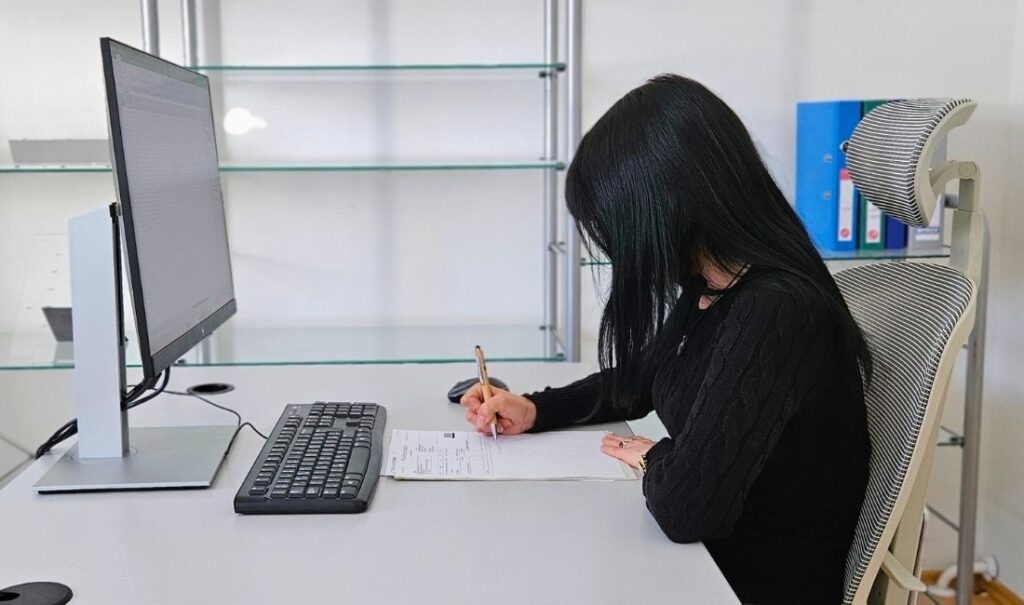
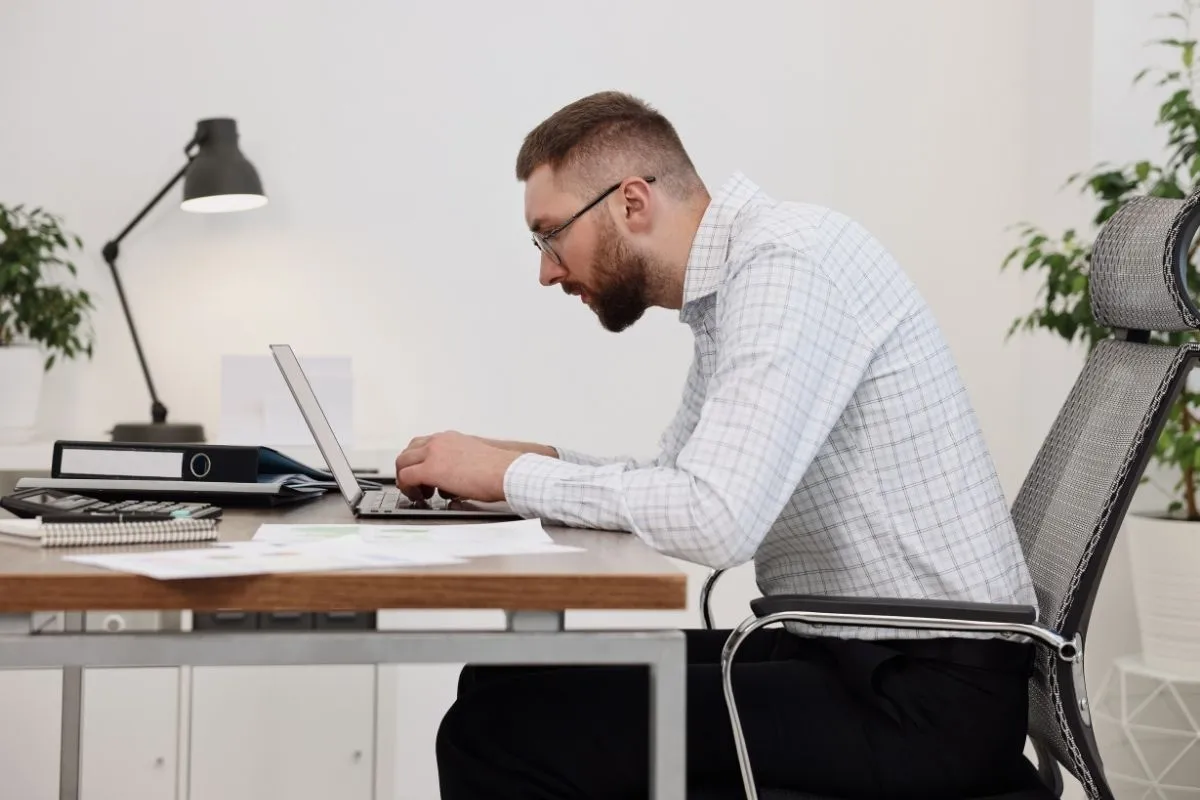
Writing forces the neck to bend downward
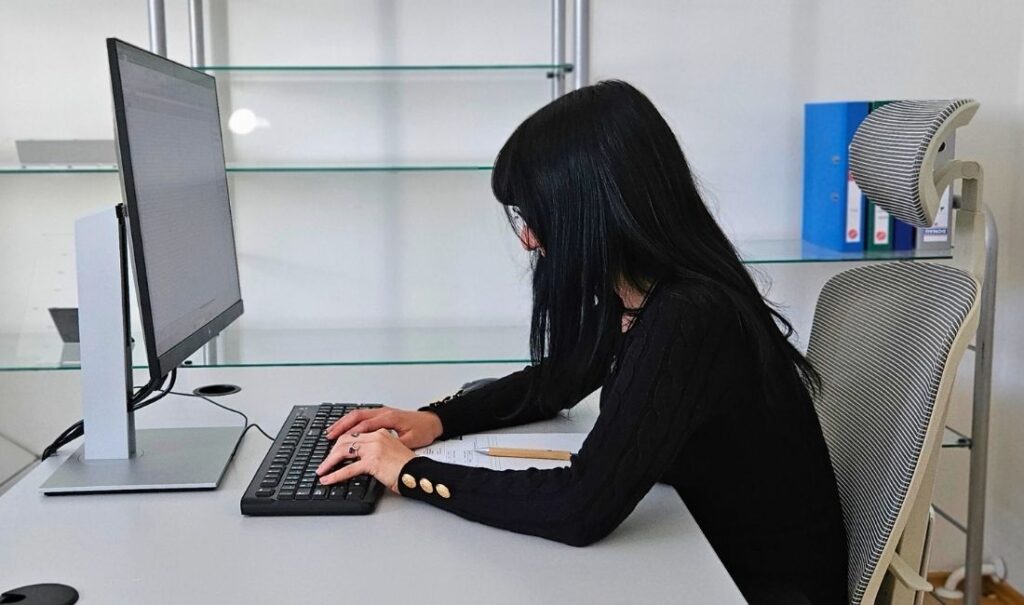
Writing forces the neck to bend downward
Working with paper documents while typing pulls the body forward
Even a good ergonomic chair cannot fully compensate for poor visual workflow habits. Read more: →Do ergonomic chairs help back pain? Not on their own
Most people are not consciously thinking about posture while working. They are focused on completing the task itself.
An accountant may switch between invoices and spreadsheets hundreds of times during the day. A student may repeatedly alternate between notes and digital content. An administrator may constantly move between paperwork and the monitor during data entry tasks.
Over time, these repetitive visual behaviors can gradually influence movement patterns throughout the workday.
Load x Time = Strain
A single downward movement is usually not a problem. But repeated hundreds or thousands of times throughout the day, these small posture adjustments can gradually increase cumulative strain on the neck, shoulders and upper back.
Eye-level documents change the way we work
Even relatively small changes in document height and viewing angle can significantly change how we interact with our workstation.
The position of a document changes more than viewing comfort. It also changes how the body interacts with the workstation during concentrated work.
When documents are positioned closer to eye level, the visual transition between paper and screen becomes smaller and more natural. Instead of repeatedly changing between very different viewing angles, the eyes can move more smoothly between tasks.
For many people, this creates a more stable and supported working position.
Eye-level documents may help:
- reduce unnecessary downward gaze
- support smoother visual transitions
- reduce repeated repositioning during work
- keep visual information closer to the natural viewing zone
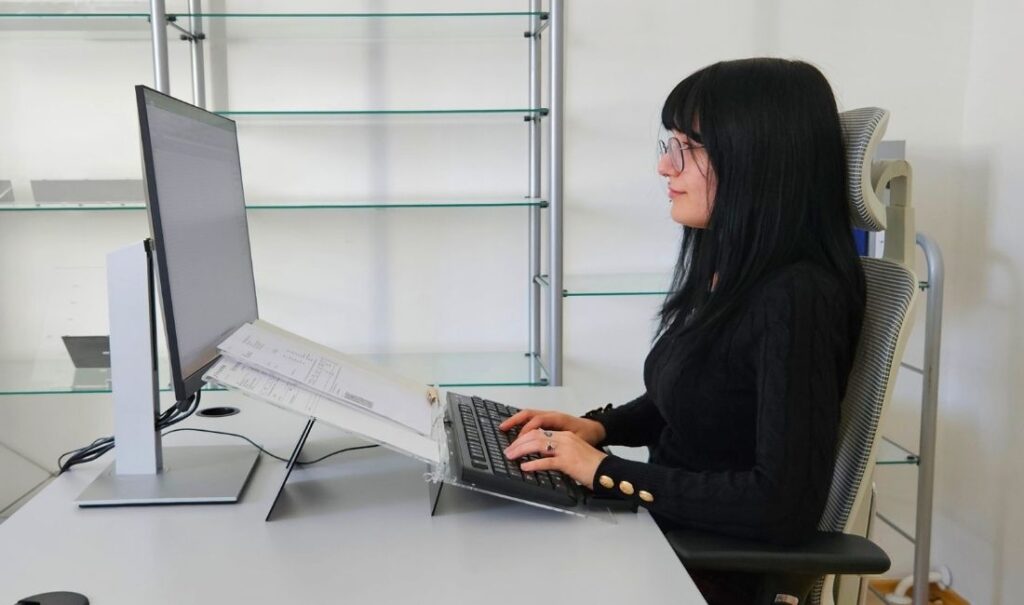
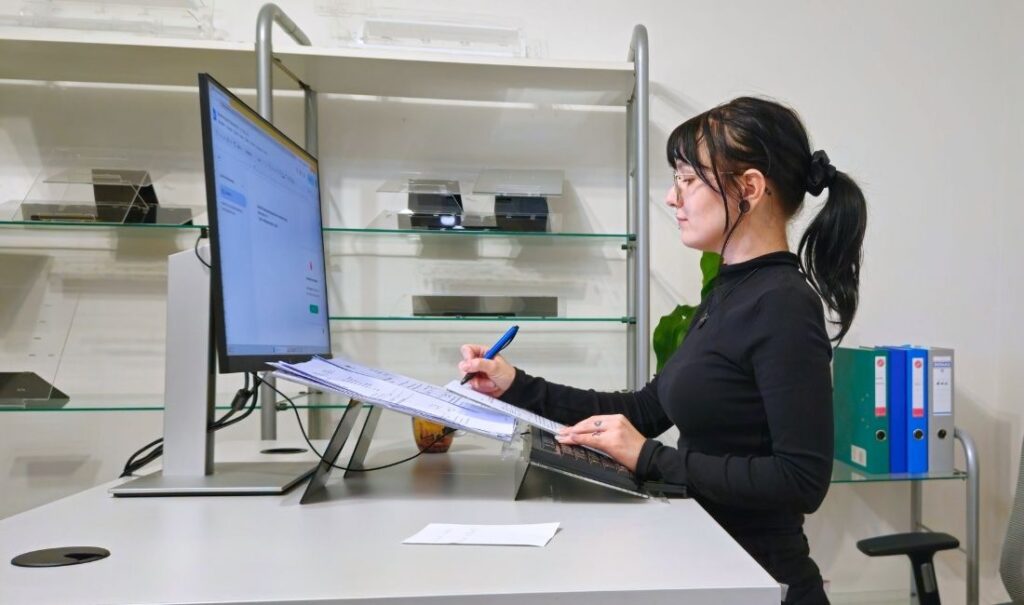
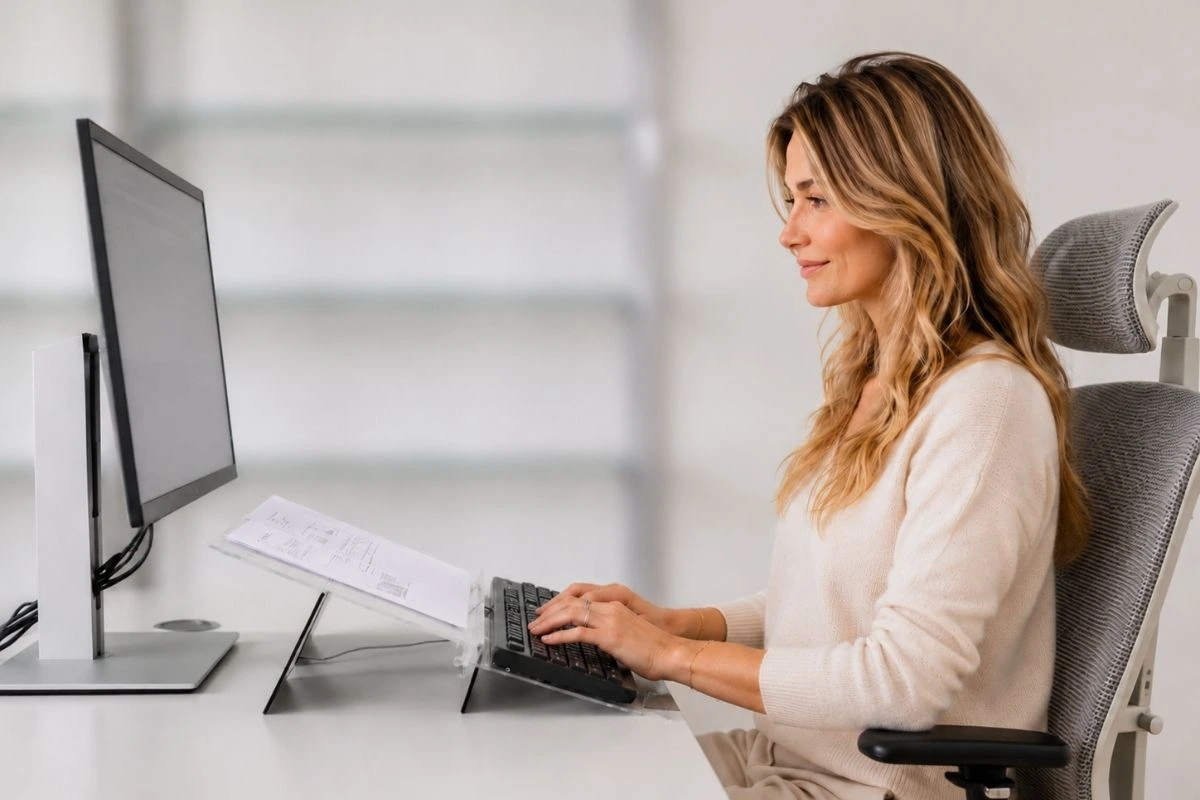
Bringing documents closer to eye-level reduces the need to bend down
This is one reason why document holders are commonly used in ergonomic workstation setups.
The goal is not to keep the body perfectly still. The goal is to reduce unnecessary repetitive movement during focused work.
A document setup that supports posture
A document setup does not need to be complicated to improve visual workflow. In many cases, relatively small adjustments can make concentrated work feel more natural and physically supported.
A more ergonomic setup usually keeps documents closer to eye level and within the natural viewing zone. This reduces the need for repeated downward gaze and makes transitions between paper and screen feel smaller and smoother during work.
It also helps when the viewing distance between documents and monitor remains relatively similar. For many people, this creates a more stable working position during focused tasks.
A setup works best when:
- the keyboard stays closer to the user
- documents do not force repeated forward leaning
- the neck remains in a more neutral position during reading and typing
- the eyes move more than the head
Different people and professions may require different setups.
An accountant working with invoices may need a different arrangement than a student reading study materials or an administrator entering data.
This is why ergonomic workstation setup should always reflect real working conditions, not only ideal diagrams.
If you would like professional guidance for your specific workstation, we offer a →free ergonomic consultation focused on posture, visual workflow and real everyday work patterns.
Conclusion:
Posture follows visual behavior more than many people realize.
During focused work, the body naturally adapts to where documents, keyboard and screen are positioned. Over time, these small repeated movements gradually influence neck strain, upper body posture and overall comfort during work.
This is why document ergonomics is not only about organizing paperwork. It is also about creating a visual setup that supports more natural movement throughout the day.
Frequently asked questions
Here are the most common questions about printed documents and their effect on posture. And if you have more questions about your setup or want help improving your workspace, feel free to reach out at info@elitype.com. We’re happy to help you find a setup that actually works.
Can document placement affect neck pain?
Yes. Repeatedly looking down at documents during work may gradually increase neck and upper body strain, especially when switching between paper documents and a screen throughout the day.
Where should documents be placed on a desk?
Documents are usually easier on the body when positioned closer to eye level and near the monitor, reducing unnecessary downward head movement during work.
Do document holders improve posture?
A document holder can help create a more natural visual workflow by keeping documents within a more comfortable viewing zone during focused tasks.
Why do I lean forward while working with documents?
Many people naturally lean forward when documents are placed flat on the desk, especially during concentrated work where posture awareness decreases.
Is document ergonomics important in modern offices?
Yes. Although some jobs are fully digital, many professions still rely on printed documents during everyday work, including administration, accounting, education and healthcare.
Is document placement alone enough to improve posture?
Document placement is an important part of office ergonomics, but posture is also influenced by monitor height, keyboard position, chair support and overall visual workflow during work.
For a broader explanation of how workstation setup affects posture, read →Computer posture: why your setup causes neck pain and how to fix it