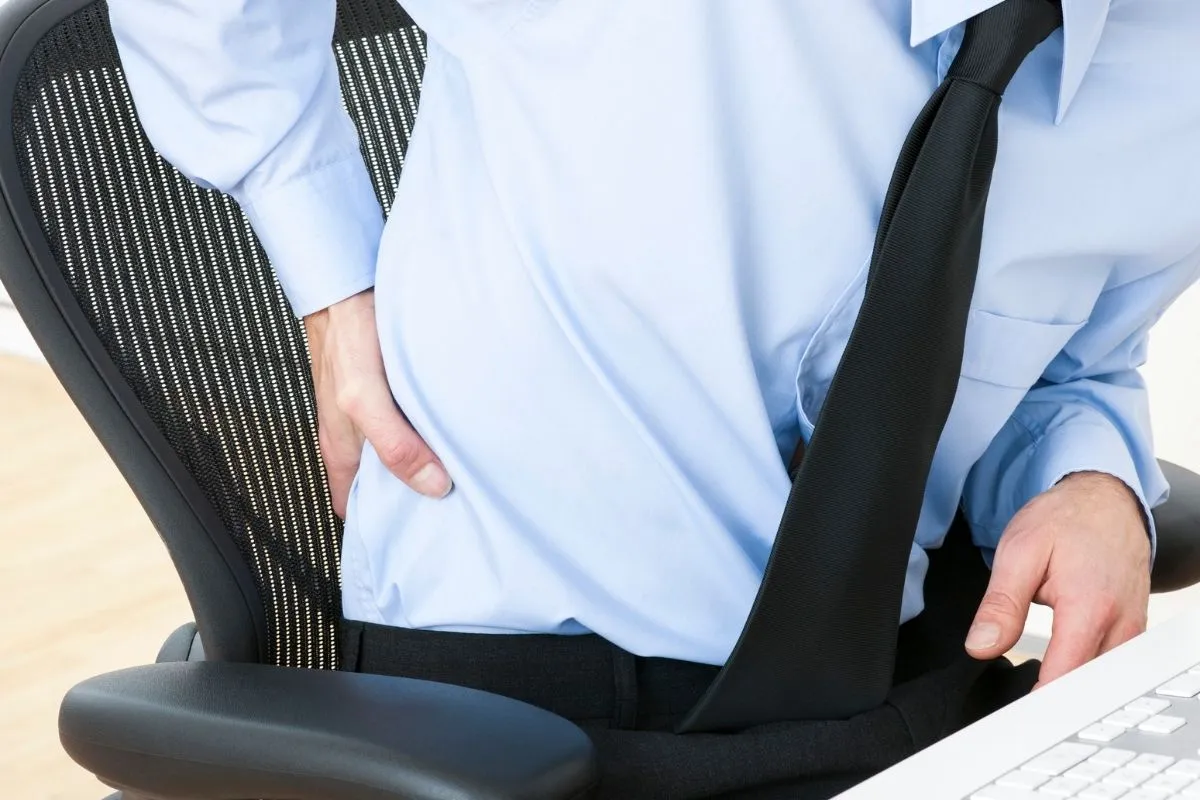
Quick answer:
Ergonomic chairs can help reduce back pain, but only when combined with proper movement and a well-adjusted workspace – not on their own. By themselves, they don’t address the main causes of discomfort.
Ergonomic chairs improve posture and reduce pressure on your back. But they don’t solve the main reason most people experience back pain at a desk.
If they did, millions of office workers wouldn’t still struggle with it every day.
The chair isn’t the problem.
How you work is.
Keep reading to understand why your chair isn’t enough, or jump straight to what actually helps →See the solution
Can an ergonomic chair help with back pain?
Ergonomic chairs can help with back pain, especially compared to standard office chairs. They are designed to support your spine, reduce pressure on the lower back, and promote a more neutral sitting position.
They are most effective for discomfort related to prolonged sitting, such as:
- lower back pain caused by poor support
- muscle fatigue from long sitting sessions
- general discomfort from uneven weight distribution
When used correctly, they can:
- support the natural curve of your spine
- reduce pressure on your lower back
- distribute body weight more evenly
- make sitting more comfortable over longer periods
However, these benefits depend on one key condition: your body needs to stay in contact with the chair.
And that’s where most people run into problems.
What are ergonomic chairs designed to do
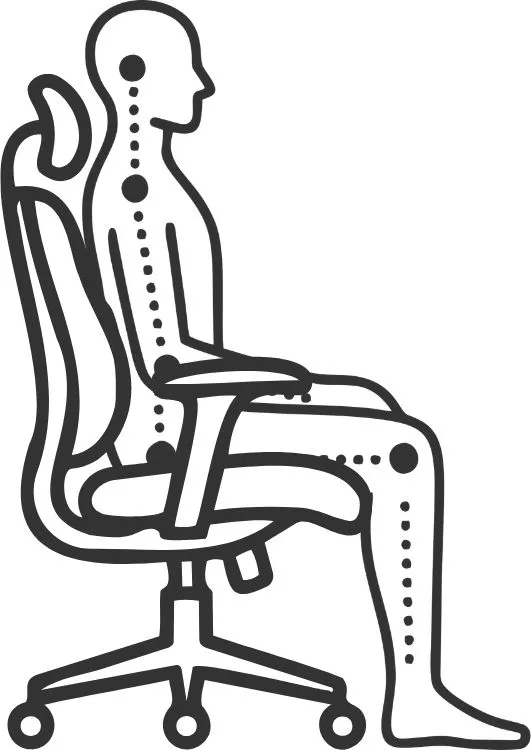
Proper support only works when your posture allows it.
Ergonomic chairs are built to keep your body in a neutral, supported position during prolonged sitting.
Their main functions include:
- maintaining the natural alignment of your spine
- reducing load on the lower back
- distributing body weight evenly
- supporting an upright sitting posture
These features can significantly reduce discomfort, especially compared to non-ergonomic chairs.
Why your back still hurts even with an ergonomic chair
If you’re still experiencing back pain despite using an ergonomic chair, you’re not alone.
The reason is simple: a chair is only one part of the system, and often not the most influential one.
Back pain at a desk is usually driven by:
- how long you stay in one position
- how often you move
- how your workspace is arranged
Sitting too long is just one of the problems
It’s true, the human body isn’t designed to stay in one position for hours at a time, even if that position is “ergonomically correct”.
Research shows that prolonged sitting:
- increases pressure on the spine
- leads to muscle fatigue and stiffness
- contributes to long-term discomfort (Jung KS et al., 2020).
Even perfect posture becomes a problem when it’s held for too long. Over time, this leads to discomfort and pain, regardless of chair quality.
In reality, the best posture is a constantly changing one. Studies show that staying in one position for too long, even with good posture, can still lead to discomfort and fatigue (Mayo Clinic, 2025).
Small movements, position shifts, and micro-adjustments throughout the day are essential for keeping your body comfortable and reducing strain. A chair can support you, but it can’t make you move.
The hidden problem: you’re not using your lumbar support
One of the biggest reasons ergonomic chairs fail to reduce back pain is surprisingly simple: most people don’t actually use their lumbar support.
Lumbar support is designed to maintain the natural S-curve of your spine and reduce strain on your lower back. But it only works if your lower back stays in contact with it.
In practice, this rarely happens.
Whenever you focus on your work, your body naturally shifts position; whether you’re typing, reading on a screen, or working with documents.
When that happens:
- your back loses contact with the chair
- your spine starts to round
- your muscles take over the load
Over time, this leads to fatigue, tension, and pain. Even if your chair is perfectly adjusted.
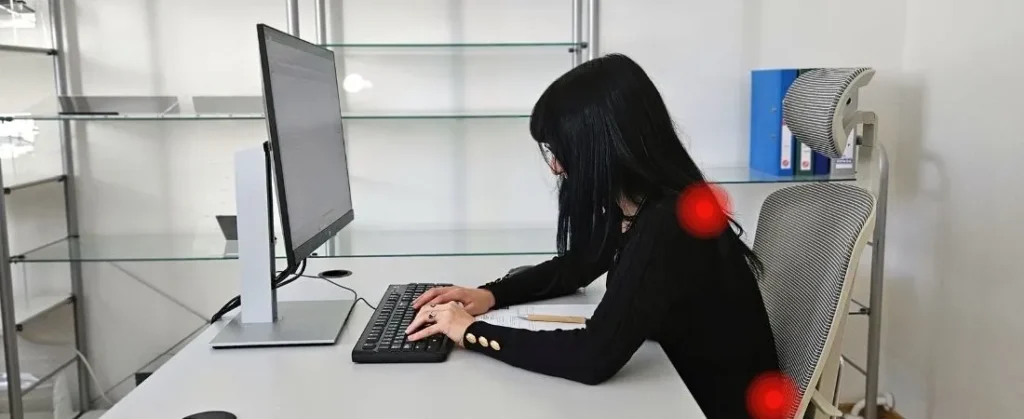
Poor setup forces your body out of alignment and reduces back support.
Above-desk ergonomics: how your setup affects your posture
Most advice about back pain focuses on the chair. But in reality, what happens above your desk has a greater impact on your posture.
Whenever you need to focus or interact with your workspace, your body naturally moves forward. Common triggers include:
- looking down at a keyboard
- focusing on a screen that is too low or too far away
- working with printed documents placed flat on the desk
One of the biggest triggers is typing. Around 90% of people don’t touch type, meaning they regularly look down at the keyboard while working, which gradually shifts the body out of alignment and reduces back support.
Printed documents make this even worse. Because they lie flat on the desk, they force you to look down for extended periods of time, keeping you in a forward-leaning position.
Over time, this becomes your default working position. Instead of being supported by your chair, your body is constantly holding itself up. Studies show that over time, this leads to tension in the neck and shoulders, as well as fatigue and discomfort in the lower back (Kenneth, 2014).
Why your setup determines whether your chair works
A chair can provide support, but your setup determines whether that support is usable.
An ergonomic chair is an essential foundation for a healthy workspace, but on its own, it’s not a complete solution to back pain.
You can think of it like a steering wheel in a car: it’s critical for control, but without the rest of the system, it won’t get you very far. The same applies to ergonomics.
Ergonomics is a system, not a product
Back pain at a desk isn’t caused by one thing and it can’t be solved by one thing either.
Effective ergonomics depends on how different elements work together:
- your chair
- your desk height
- your screen position
- your keyboard placement
- how you interact with all of them
If even one of these is misaligned, your posture compensates; often by pulling you forward and away from the support of your chair.
Without proper setup, even the best chair has limited impact
Most workspaces are set up in a way that unintentionally encourages poor posture.
Common issues include:
- screens that are too low or too far away
- keyboards placed too far away
- documents placed flat on the desk, forcing you to look down
Each of these increases the likelihood of losing back support during work. That’s why many people invest in expensive ergonomic chairs and still experience discomfort.
What actually helps with back pain at a desk
If an ergonomic chair isn’t enough on its own, what actually makes a difference?
The answer is simple: reducing strain requires a combination of movement, proper setup, and better work habits. When these elements work together, your chair can finally do what it’s designed to do: support your body instead of compensating for it.
Movement matters more than equipment
Even the best chair can’t replace movement.
Regular movement helps reduce pressure on your spine, prevents muscle fatigue, and keeps your body from becoming stiff.
Simple habits like standing up every 30-60 minutes, walking, or changing position throughout the day can make a bigger difference than any piece of equipment.
Reduce back pain: quick checklist
✓ Move every 30-60 minutes
✓ Keep your screen at eye level
✓ Keep your keyboard close to your body
✓ Avoid looking down while typing
✓ Change positions throughout the day
Proper workstation setup
Your workspace should make it easy to stay in contact with your chair, not pull you away from it.
Key adjustments include:
- screen at eye level to avoid looking down
- keyboard close enough to prevent reaching forward
- documents positioned upright instead of flat on the desk
See how your desk setup causes neck pain →Computer posture: why your setup causes neck pain (and how to fix it)
When your setup is aligned with your body, you naturally stay more upright and supported without constantly correcting your posture.
Aligning keyboard and documents with a line of sight
One of the most effective ways to stay supported while working is to remove the need to lean down to look at the keyboard or documents.
When your eyes stay in line of sight with the screen:
- your head remains upright
- your spine stays aligned
- your back stays in contact with the chair
This allows your lumbar support to work continuously, instead of being interrupted throughout the day.
This is exactly the gap most workspaces have and Elitype is designed to solve.
Instead of forcing you to constantly adjust your posture, it brings your keyboard and documents into your natural line of sight. That means:
- less leaning forward
- consistent contact with lumbar support
- less strain on your back throughout the day
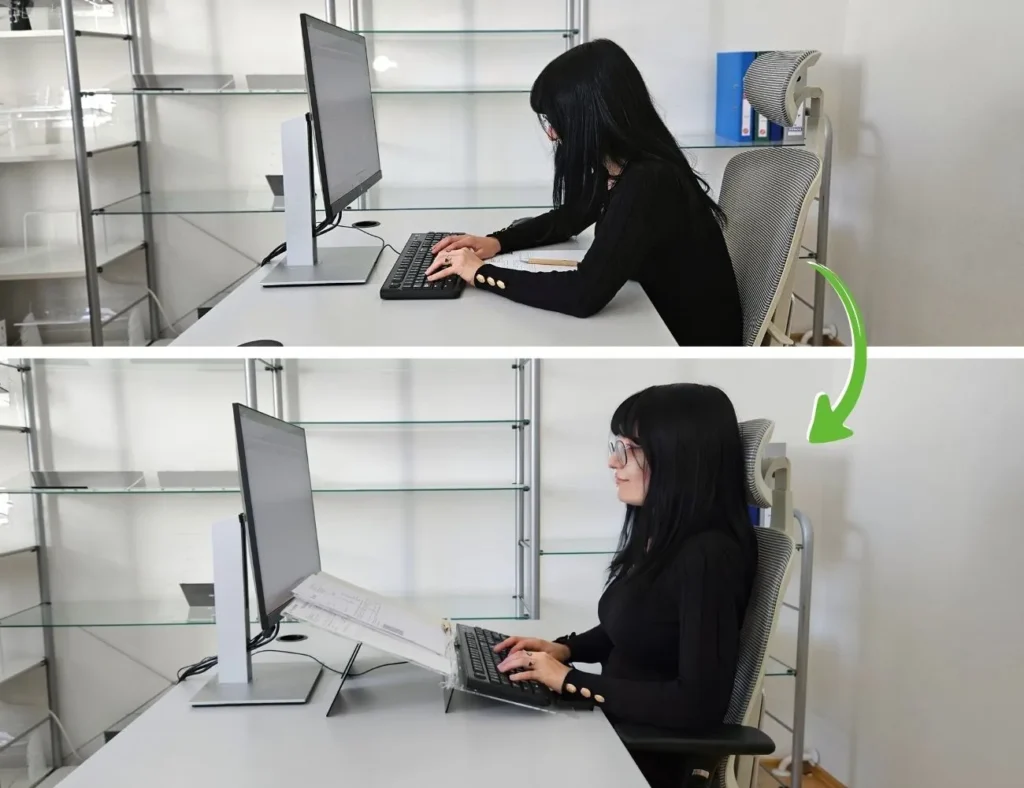
Elitype removes the need to lean down, allowing the chair to do it’s job
Conclusion:
Your chair isn’t the problem. Your setup is.
An ergonomic chair can support your body, but lasting comfort comes from how your entire workspace works together.
That’s why solving back pain isn’t about upgrading your chair. It’s about improving the system around it. And when your setup and habits support your posture, your chair can finally do what it’s meant to do.
Frequently asked questions
Here are the most common questions about ergonomic chairs and back pain. And if you have more questions about your setup or want help improving your workspace, feel free to reach out: info@elitype.com. We’re happy to help you find a setup that actually works.
Do ergonomic chairs help with back pain?
Yes, when combined with movement and proper setup.
Why does my back hurt even with a good chair?
Because consistent support is often lost during work due to posture and setup.
Are expensive ergonomic chairs worth it?
They can improve comfort, but without proper setup and movement, their impact is limited.
Can a bad chair cause permanent back pain?
A poor chair or setup can contribute to long-term discomfort, but most back pain is reversible when posture, movement, and workspace setup are improved.
Is sitting or standing better for back pain?
Neither on its own. Alternating positions and moving regularly is more effective.
What is the best sitting position?
There isn’t one fixed position – regular movement and variation are more important.
Can keyboard position cause back pain?
Yes. Poor positioning can affect posture and reduce back support.
Why does my lower back hurt when I type?
Because your posture often shifts during typing, reducing support and increasing muscular load.